
01 / Assist
AI proposes
Finding, recommendation and CAP language.

Audit Management

Designed for authorities that oversee aviation security.
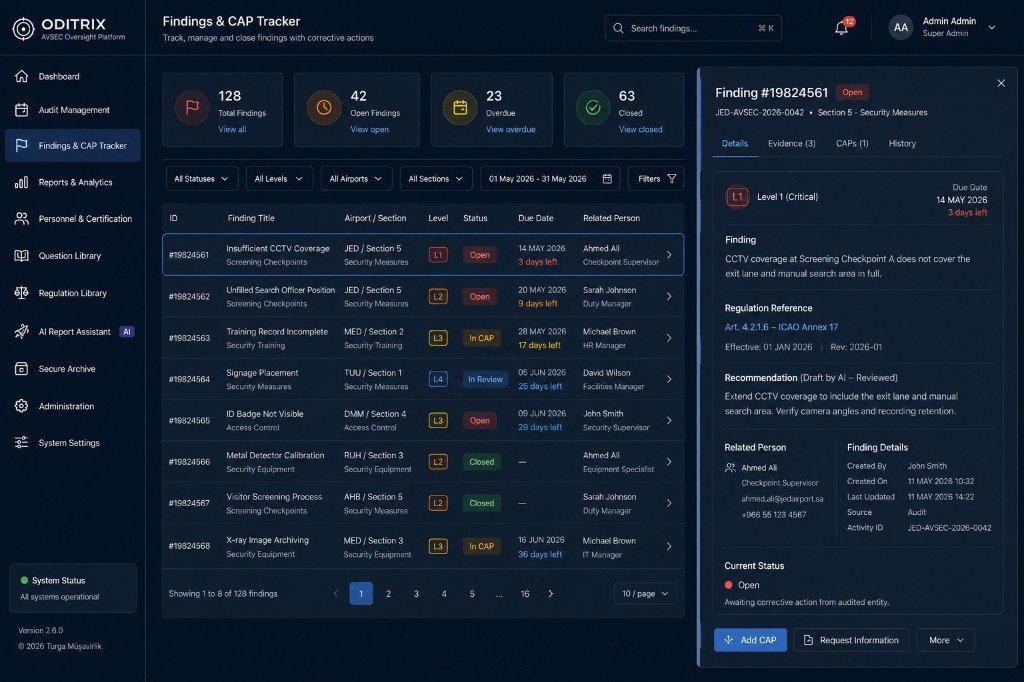
Evidence, deadlines and corrective actions in one governed workspace
Explore the platform



Oditrix binds regulation to field work, findings to corrective action, and monitoring back into the next plan.
Seven governed stages keep regulation, evidence, ownership and authority attached to the work.
Plan
Activity, site, team, duration, question set
Assign
Commitment text accepted
Execute
Hints, evidence, levels, due dates
Review
Lead Auditor + AI-assisted report
Remediate
CAP submitted and reviewed
Close
Super Admin approval
Monitor
Deadlines, repeats, scores
AI proposes finding, recommendation and CAP language in standard AVSEC terminology. Auditors review, authorised users approve, Super Admin closes.
01 / Assist
Finding, recommendation and CAP language.
02 / Judgement
Context and professional judgement remain human.
03 / Authority
AI cannot close findings or approve audits.
Plan and execute. Govern and remediate. Monitor and analyse. Keep people and closed records under control.

01 / Plan & Execute
Plan audits, inspections, tests & surveys; assign teams; track status.
Audit, inspection, test and survey planning
Team assignment and status tracking
Super Admin sign-off for opening and closure
System-captured timing and completion checks

02 / Plan & Execute
Sections, question banks and legal articles — versioned and controlled.
Controlled question banks and sections
Question–article references
Customer-authorised regulatory content
Audit records tied to the regulation in force at the time

03 / Plan & Execute
Offline-capable mobile workspace with the full question screen.
Offline-capable mobile and tablet work
Regulation hints at the point of work
Photo evidence attached to findings
Device data cleared after transmission

04 / Govern & Remediate
Finding → Recommendation → CAP drafts in standard AVSEC terminology.
Finding, recommendation and CAP draft language
Standard AVSEC terminology
Auditor review and editing
No autonomous closure or audit approval

05 / Govern & Remediate
Deadlines, follow-up audits, repeated findings and corrective-action review.
Due dates and named ownership
CAP submission and review
Repeated-finding detection
Follow-up and verification workflow

06 / Monitor & Analyse
30+ reports, airport security scores, hotspots and trend views — Admin / Super Admin.
30+ management reports
Airport security scores and trend views
Severity hotspots by section and site
People, sites, sections and findings reporting

07 / People & Assurance
Personnel files, certificates, validity dates, assignment gates and 90-day warnings.
Personnel files and certificates
Validity date monitoring
Assignment gates
90-day expiry warnings

08 / People & Assurance
Closed audits, final reports and CAPs — UIDN-stamped, Admin-controlled.
Closed audits, final reports and CAPs
UIDN-watermarked downloads
Admin-controlled access
Accountable audit trail
Open findings, deadlines and repeat signals are watched continuously — inspired by continuous-monitoring principles of USAP-CMA.
Audit completed
Findings remain live
CAP deadlines monitored
Repeated findings detected
Security score updated
Management alerted
Follow-up / verification
Risk profile updated
Built for decision-makers who need ownership, access discipline and auditability.

Internal-network deployment on customer infrastructure — your staff install, engineers guide remotely.

Offline-capable field work; sync when linked; device data cleared after transmission.

Role-based access, dual-control approvals, UIDN-watermarked archive downloads.

Encryption, MFA and directory integration per the customer’s approved architecture.
A high-level architecture for decision-makers who need to understand ownership, data movement and operational boundaries.
01 / Field zone
Offline work · evidence capture · data cleared after sync
02 / Customer security perimeter
Regulation library · analytics · AI layer*
03 / Management layer
Planning · approvals · reporting · archive
* AI processing per approved deployment architecture. Operational audit data remains within the customer’s controlled infrastructure.
Final authority on closure and location removals
Plans audits, tracks findings, reviews CAPs
Distributes sections, signs the final report
Field execution, findings, severity
View-only training role with structured feedback
Completion checks, two-step confirmations, enforced question–article references, system-captured timing and consent before access.
Opening and closing audits requires Super Admin sign-off.
Customer-authorised content is versioned and linked.
AI cannot close findings or approve audits.
Every audit stays tied to the regulation in force at the time.
Next step
Demonstrate Oditrix on a representative AVSEC workflow within your operational environment.